


Quick Insight: WhatsApp Web group calls are appearing for some beta users, but they are still limited rather than broadly available across all accounts. WhatsApp Web calling exists, but group voice and video calls in the browser still appear to be rolling out gradually by account.
A new WABetaInfo report says WhatsApp is expanding web calling from one-to-one calls into group chats, letting some beta testers start voice or video group calls directly from the browser. The useful caveat is availability: if the call button is not visible in your group chat on WhatsApp Web, your account probably does not have the feature yet.
That makes this less of a generic WhatsApp Web update and more of a browser-calling shift. The question is whether the web version can now handle the kind of group coordination that used to push people back to mobile or the desktop app.
From one-to-one calls to group coordination
The new beta builds on individual voice and video calling support that WABetaInfo says reached the web client earlier this year, in February 2026. At the time, web calling only covered individual chats, while group calling remained under development.
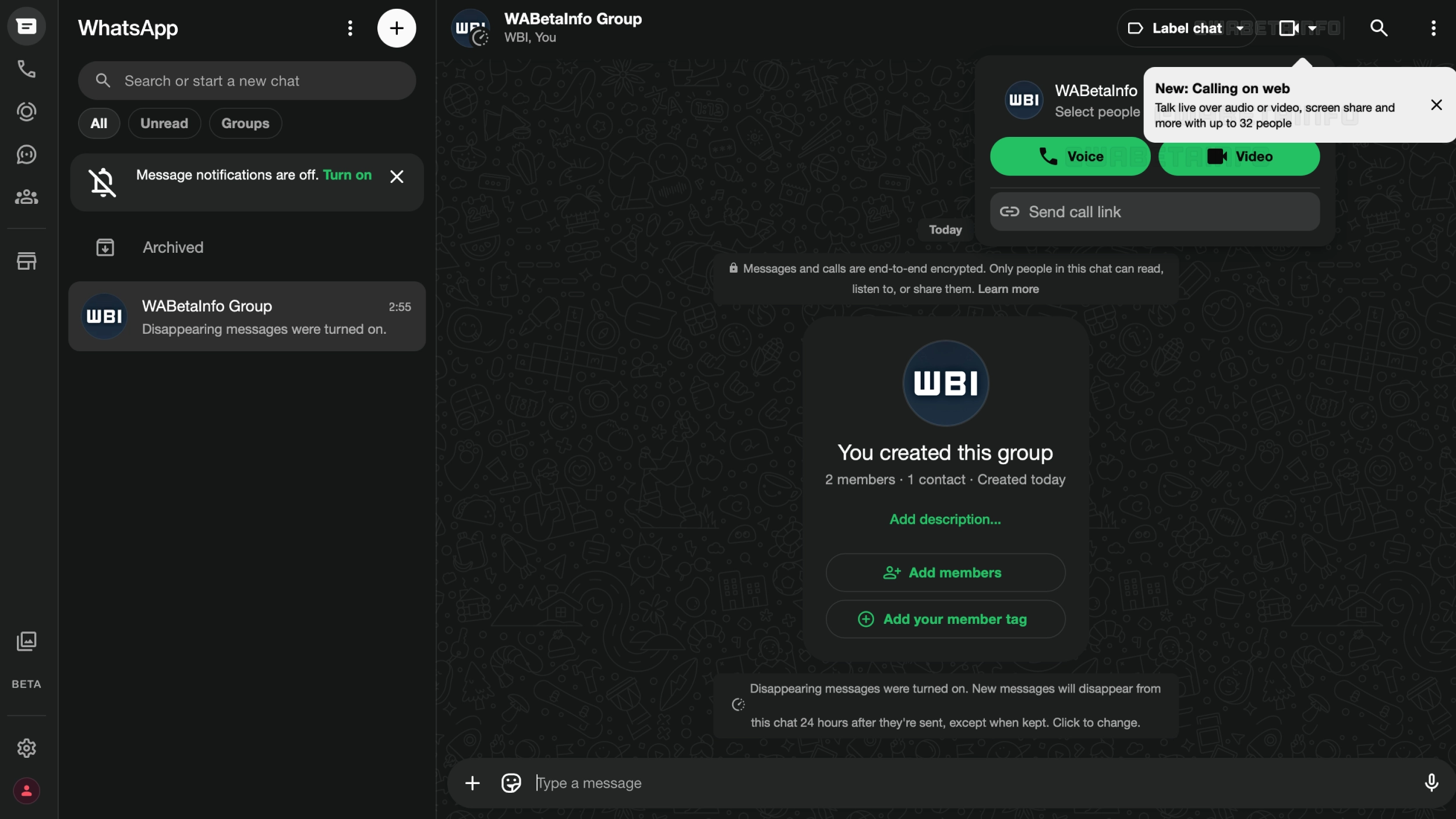
This rollout changes that. Some beta testers can now open a group chat on WhatsApp Web and look for the call button at the top of the conversation. If the button is available, they can choose between a voice call and a video call before connecting.
There is also a useful detail in how the feature works: users can select which people from the group to include in the call. That means starting a smaller call with a subset of a group, rather than automatically pulling in everyone. For large family chats, community groups, work coordination threads, or creator teams, that small control makes the browser experience feel less like a mirror of mobile and more like a practical tool.
How to check if WhatsApp Web group calls are available
The simplest way to check is to open WhatsApp Web, go into a group chat, and look for the call controls at the top of the conversation. If the feature is available, the call button should let you choose between a voice call and a video call before connecting.
If you do not see those controls, the feature is probably not available for your account yet. The current rollout is still being described as limited to some beta testers, so the safer answer is to use the mobile app or desktop app for group calls until the browser option appears. The browser is useful for quick access from a laptop, but the app remains the more reliable fallback when group calling needs to work today.
Voice, video, limits, and beta status
The reported WhatsApp Web group-call rollout covers both voice and video calls. WABetaInfo says group calls on the web support up to 32 participants, matching the broader WhatsApp group-calling limit that WhatsApp lists for group calls across its calling product.
The important status detail is beta versus stable. WhatsApp’s own calling pages describe voice and video calling, group calls, end-to-end encryption, and up to 32 people for group calls, but the specific browser-based group-call rollout is still best treated as limited. In practice, availability may depend on your account, browser, and whether you are included in the current rollout.
This does not make WhatsApp a Zoom replacement overnight. The rollout is still limited to some beta testers, and WhatsApp has not made a broad official announcement around the feature. But the direction is clear enough: Meta is reducing the number of moments where WhatsApp users have to switch devices or install a separate client to keep a conversation moving.
Why this matters for brands and communities
For brands, the most immediate implication is not advertising. It is operations and audience management.
Many brands already use WhatsApp informally for customer groups, local teams, creator coordination, event planning, community updates, and regional support. If group calling becomes a standard part of WhatsApp Web, those same groups can move from text coordination to live conversation inside the same thread, from a work laptop, without forcing people back to their phones.
That is especially relevant for markets where WhatsApp is already the default messaging layer between businesses and customers. The ability to select only certain group members for a call could make the feature more useful for quick internal huddles, VIP community conversations, ambassador coordination, or support escalations that begin in a group chat but need a live exchange.
It also connects to WhatsApp’s broader identity and workflow shift. Features like WhatsApp usernames, multi-account support, and WhatsApp’s expanding role around live events all point in the same direction: WhatsApp is becoming less tied to one phone-number identity on one device, and more useful across the surfaces where people already work, organize, and coordinate.
The brand lesson is simple: if your audience already organizes around WhatsApp groups, the browser is becoming part of that behavior too. Planning for WhatsApp as a messaging channel only may soon feel too narrow.
A small rollout with a bigger signal
The feature is still in beta, and that caveat matters. Not everyone will see the call button yet, and availability depends on WhatsApp expanding the rollout over the coming weeks.
Still, the product logic is hard to miss. First came individual calls on the web. Now come group voice and video calls. Add support for up to 32 participants, end-to-end encryption, screen sharing, and selective participant invites, and WhatsApp Web starts to look less like a secondary interface and more like a browser-based communication hub.
The strategic consequence is that WhatsApp groups are no longer tied as tightly to the phone in your hand. They are moving into the tab where work, planning, support, and community management already happen.