


Adobe’s experimental camera app is starting to behave less like a tool you use after the shot, and more like a photography coach standing next to you while you take it.
As TechCrunch reports, Adobe is adding new AI-powered features to Project Indigo, its experimental iOS camera app launched last year. The app already offered pro controls, multi-frame super-resolution, and different capture modes. Now Adobe is layering in AI features that can critique photos, suggest edits, remove objects, generate depth of field, and apply different styles.
The most interesting part is not that Adobe is putting AI into a camera app. Everyone is putting AI everywhere. The more interesting move is that Adobe is trying to shift AI photography from prompt-writing to decision-making.
From editing prompts to creative guidance
Marc Levoy, who leads the Adobe project and previously helped develop Google Pixel’s camera technology, told TechCrunch that many generative AI editing tools still depend on users finding the right prompt. That can be messy. The new Project Indigo features are designed more like buttons, producing more predictable results without forcing users to describe every desired change in text.
There are two new guidance features in particular. The first is a photo critique, which gives what Adobe describes as a “professional” opinion on framing, lighting, colors, and emotional impact. The second offers capture and edit suggestions, including advice on how to reshoot a photo by changing framing, exposure, or objects in the viewfinder.
In TechCrunch’s test, the app even suggested removing a hexagonal white object from the frame. It also provides a second layer of suggestions for improving an existing photo using Adobe Lightroom controls.
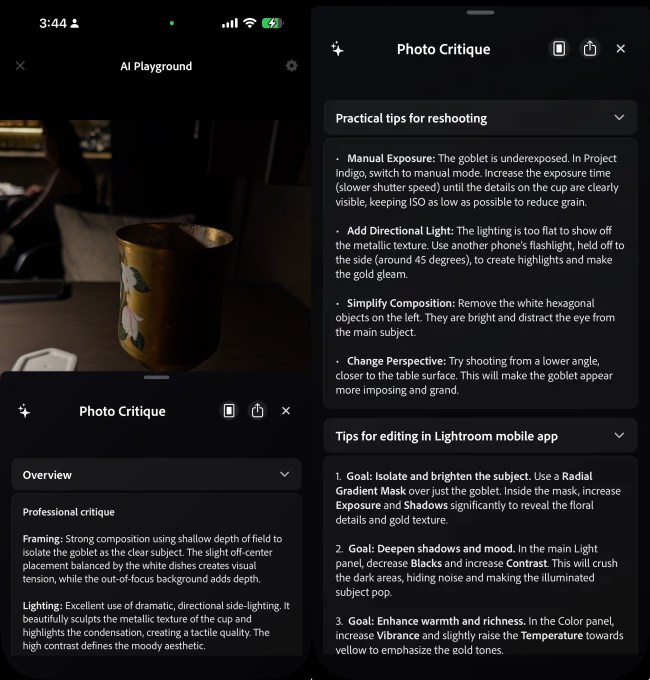
That matters because it makes the AI less of a magic retouching box and more of a creative assistant that explains what it sees. It is not just changing pixels. It is trying to change the user’s eye.
Google has already moved in this direction with its Pixel camera coach feature, which offers framing suggestions. But Project Indigo appears to go further into specific critique, with feedback across composition, exposure, color, and post-production. For casual users, that could make the app feel more useful than another AI filter. For more serious photographers, it could either become a learning layer or an annoying second opinion. Probably both.
The camera is becoming the classroom
The rest of the update shows how quickly AI photo tools are moving upstream. Object removal has been available for years across Apple Photos, Google Photos, and Adobe Photoshop, but it often requires users to circle or select the object manually. Project Indigo’s newer approach promises a more guided version of that process, alongside advanced object removal, depth-of-field generation, and style changes.
The direction is clear: AI is no longer waiting for the user to finish creating before it helps. It is moving into the capture moment, when composition, lighting, subject placement, and intent are still fluid.
For Adobe, that is a smart place to experiment. The company already owns powerful editing workflows through Lightroom and Photoshop. Project Indigo gives it a way to test whether AI can influence the moment before those tools are needed. If it works, editing becomes less about rescuing a weak image and more about teaching users how to make a stronger one in the first place.
There is also a bigger interface lesson here. Prompt-based creativity asks users to articulate what they want. Button-based critique asks the system to understand what is already there and suggest what might work better. That is a very different kind of AI relationship, especially on mobile, where fast, visual, low-friction guidance usually wins.
The strategic consequence is simple: the next phase of AI photography may not be about making every image look artificially perfect. It may be about turning the camera itself into the first creative director.